What is tool use?
Your existing workflows rely on a lot of different technologies — project management software, databases, files. Claude can't just check these things itself. Instead, it relies on tools, which give Claude access to external data and actions.
한국어 대본
- 00:00우리는 프로젝트 관리 소프트웨어, 데이터베이스, 파일 등 기존 워크플로에서 비롯된 다양한 기술에 의존합니다.
- 00:09그리고 Claude는 이런 것들을 스스로 확인할 수는 없습니다.
- 00:11대신, Claude는 외부 데이터와 액션에 접근할 수 있게 해 주는 도구에 의존합니다.
- 00:19간단히 말해, 도구는 Claude에 노출하기 위해 정의하는 함수입니다.
- 00:24무엇을 하는지, 어떤 입력을 받는지 설명하면 Claude가 언제 호출할지 결정합니다.
- 00:31Claude는 도구를 실행하지 않고, 코드가 실행합니다.
- 00:33그래서 흐름은 Claude가 요청하면 코드가 실행되고, 그 결과가 다시 Claude에게 돌아가는 방식입니다.
- 00:43도구는 이름, 설명, 입력 스키마를 가진 JSON 스키마입니다.
- 00:49설명은 Claude가 도구를 호출할지 결정하기 위해 읽는 내용입니다.
- 00:55설명을 모호하게 넣으면, 그것은 나쁜 도구 사용입니다.
- 00:58이것이 에이전트가 오작동하거나 사용 가능한 도구를 사용하지 못하는 가장 큰 이유입니다.
- 01:03그래서 에이전트에 보고서를 보내면, 첫 번째 턴에 돌아오는 결과는 다음과 같습니다.
- 01:08중지 사유, 도구 사용이 우리의 신호입니다.
- 01:11우리의 루프는 매개변수와 함께 lookup building code를 호출하고,
- 01:16결과를 도구 결과로 다시 전달하고, Claude는 계속 진행합니다.
- 01:20그리고 이 시점에서 도구를 호출하고 결과를 Claude에게 반환할 수 있습니다.
- 01:26여기에 에이전트 루프가 있지만, 여러 도구를 제공하려고 합니다.
- 01:29그리고 어떤 도구를 어떤 순서로 사용할지 선택하는 것을 지켜봅니다.
- 01:33이 시나리오를 상상해 보세요.
- 01:34저는 덴버로 3일 여행을 가기 위해 짐을 싸고 있습니다.
- 01:37그리고 오늘의 날씨와 앞으로 며칠간의 예보를 모두 알고 싶습니다.
- 01:40이 루프는 에이전트 루프에서 보던 것과 동일합니다.
- 01:45하지만 도구를 하나가 아니라 두 개로 선언했기 때문에,
- 01:48여기에 switch 문으로 이름에 따라 분기하는 run tool 함수가 있습니다.
- 01:53이 코드 블록은 기본적으로 코드가 실행되는 위치를 알려줍니다.
- 01:57그리고 그것이 전체 패턴입니다.
- 01:58세 번째 도구를 원한다면 배열에 추가하기만 하면 됩니다.
- 02:01switch에 case를 추가하고, 그러면 끝입니다.
- 02:04그럼 이걸 실행해 보겠습니다.
- 02:06그러면 Claude가 getWeather를 호출한 다음 getForecast를 호출하는 것을 볼 수 있습니다.
- 02:10때로는 한꺼번에, 때로는 하나씩 차례로.
- 02:14그런 다음 '겹겹이 입으세요. 오늘 눈발이 날리고, 주중에는 따뜻해집니다' 같은 식으로 답합니다.
- 02:21이제 Claude가 어떻게 선택하는지 지켜보세요.
- 02:23Claude는 설명을 읽고, 프롬프트를 오늘 날씨와 앞으로 며칠의 날씨에 대응시킨 다음, 각각에 맞는 도구를 선택합니다.
- 02:29그래서 도구 설명이 정말 중요합니다.
- 02:34방금 작성한 코드에서 아마 두 가지 문제점을 이미 눈치챘을 것입니다.
- 02:38첫째, 단순한 조회 두 개를 처리하는 데 코드가 너무 많습니다.
- 02:41둘째, 실제 코드베이스에서는 가지고 있는 모든 함수에 대해 JSON 스키마를 직접 작성하고 싶지 않습니다.
- 02:47코드를 두 번 작성하는 것과 같습니다. 하지만 바로 여기서 도구 실행기가 등장합니다. 도구 실행기는
- 02:53TypeScript, Python, Ruby용 Cloud SDK에 포함되어 있습니다. 실행기는 실제 함수를 가져와서
- 02:58타입과 문서를 읽어 스키마를 대신 만들어 주고, 도구 사용-도구 결과 루프 전체를 처리합니다.
- 03:02내부적으로 처리하므로 코드는 이제 도구를 설명하고 프롬프트를 보내고 결과를 기다리는
- 03:09결과를 기다리는 수준으로 줄어듭니다. 자, 여기 도구 실행기로 연결된 동일한 두 도구 날씨 데모가 있습니다. 동일한
- 03:16시나리오를 코드의 일부만으로 구현합니다. 따라서 while 루프도, stop reason switch도, 수동 도구 결과
- 03:23메시지에 다시 밀어 넣는 작업도 필요 없습니다. 실행기가 그 모든 것을 처리해 줍니다. JSON 스키마도 없으므로
- 03:28두 번 작성할 필요가 없습니다. 두 함수는 방금 수동으로 실행한 것과 동일한 조회이며, 단지
- 03:33일반 TypeScript일 뿐입니다. 그리고 runner.untilDone은 모든 도구
- 03:39핑퐁이 끝난 후 최종 어시스턴트 메시지를 반환합니다. 자, 실행해 보겠습니다. 그리고 조회하면 동일한 답을 얻을 수 있습니다.
- 03:46좋습니다. 실제로는 도구가 하드코딩된 날씨 데이터가 아니라 실제
- 03:51애플리케이션에 이미 있는 함수를 감싸게 됩니다. 따라서 이 규정 준수 검토에서 에이전트의 도구는
- 03:56기존의 조회 구축 코드 또는 검색 구축 코드 함수를 감싸는 얇은 래퍼이며, 그 함수들은
- 04:02이미 이 코드베이스에 있습니다. 그리고 도구 실행기를 사용하면 해당 함수를 직접 전달합니다.
- 04:07그리고 에이전트는 작성하는 모든 발견 사항에서 특정 코드 섹션을 인용합니다.
- 04:11스키마 작성이 필요하지 않습니다.
- 04:13도구는 Claude에게 시스템에 대한 접근 권한을 제공합니다.
- 04:16이름을 정의하고, 구체적인 설명을 작성하고, 입력 스키마를 설정하세요.
- 04:20또는 SDK의 도구 실행기에 실제 함수를 넘겨서 그 작업을 대신 처리하게 하세요.
- 04:25Claude는 호출 시점을 결정합니다.
- 04:27루프를 직접 실행하거나 위임합니다.
- 04:29그리고 그 스펙트럼의 맨 끝에서, 관리형 에이전트는 에이전트 전체를 Anthropic에 위임합니다.
What a tool is
Simply put, a tool is a function you define and expose to Claude. You describe what it does and what inputs it takes, and Claude decides when to call it.
Here's the key thing to internalize: Claude doesn't execute the tool — your code does. The flow looks like this:
- Claude requests a tool call.
- Your code executes the function.
- The result goes back to Claude, and it keeps going.
How tools are defined
Tools are JSON schemas with three parts: a name, a description, and an input schema. You pass them to Claude in the request body as a tools array.
The description is what Claude reads to decide whether to call the tool. If you write a vague description, you get bad tool use. This is the number one reason agents misfire or don't grab the tools that are available to them. Be specific.
Here's what a tool definition looks like:
So what happens when we use this? Say we send an agent a compliance report. On the first turn, Claude comes back with stop_reason: "tool_use" — that's our signal. Here's what that response looks like:
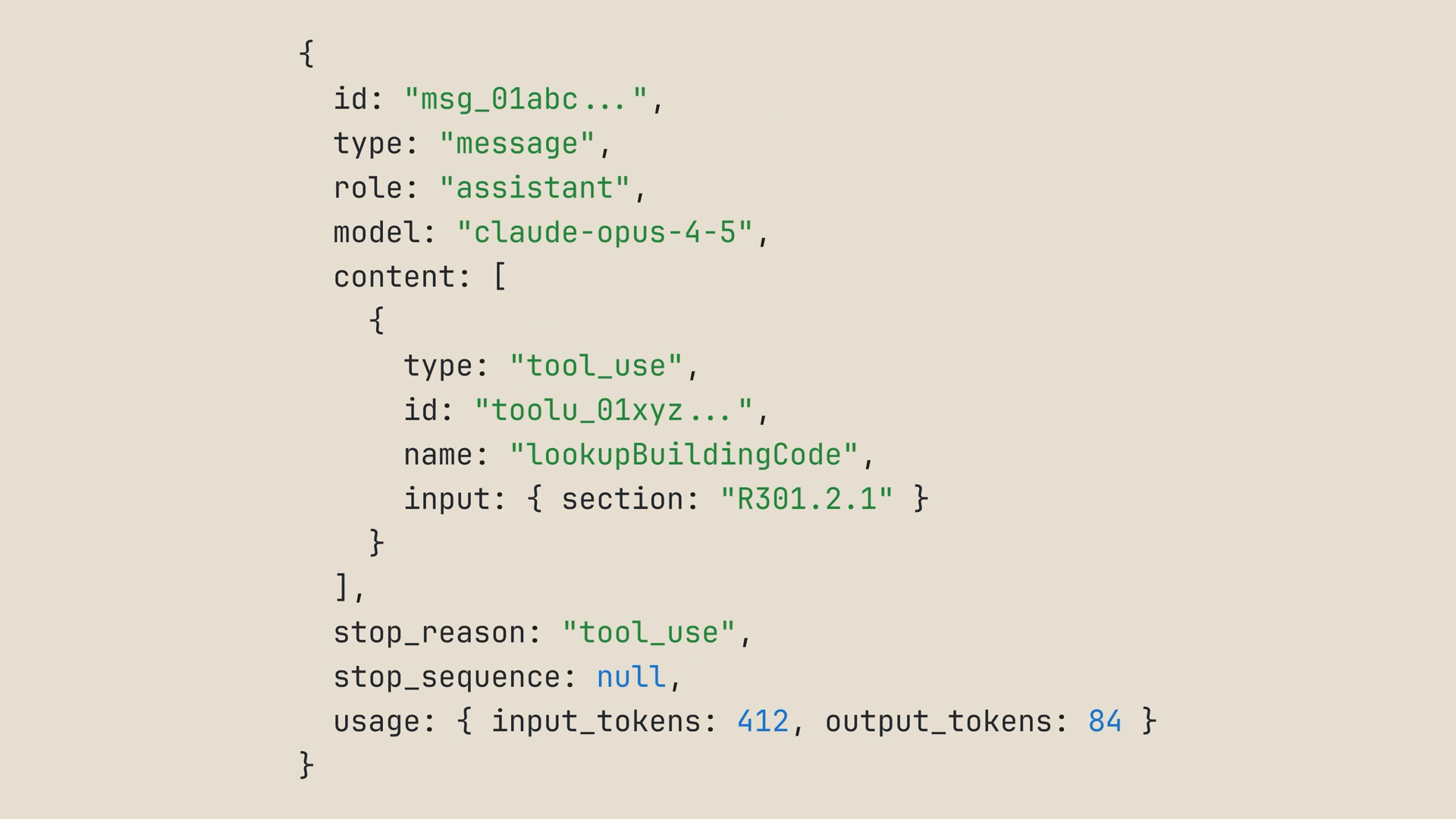
Our loop calls lookup_building_code with the parameter Claude requested, then feeds the result back as a tool result — a user message containing a tool_result block tied to the tool call's id:
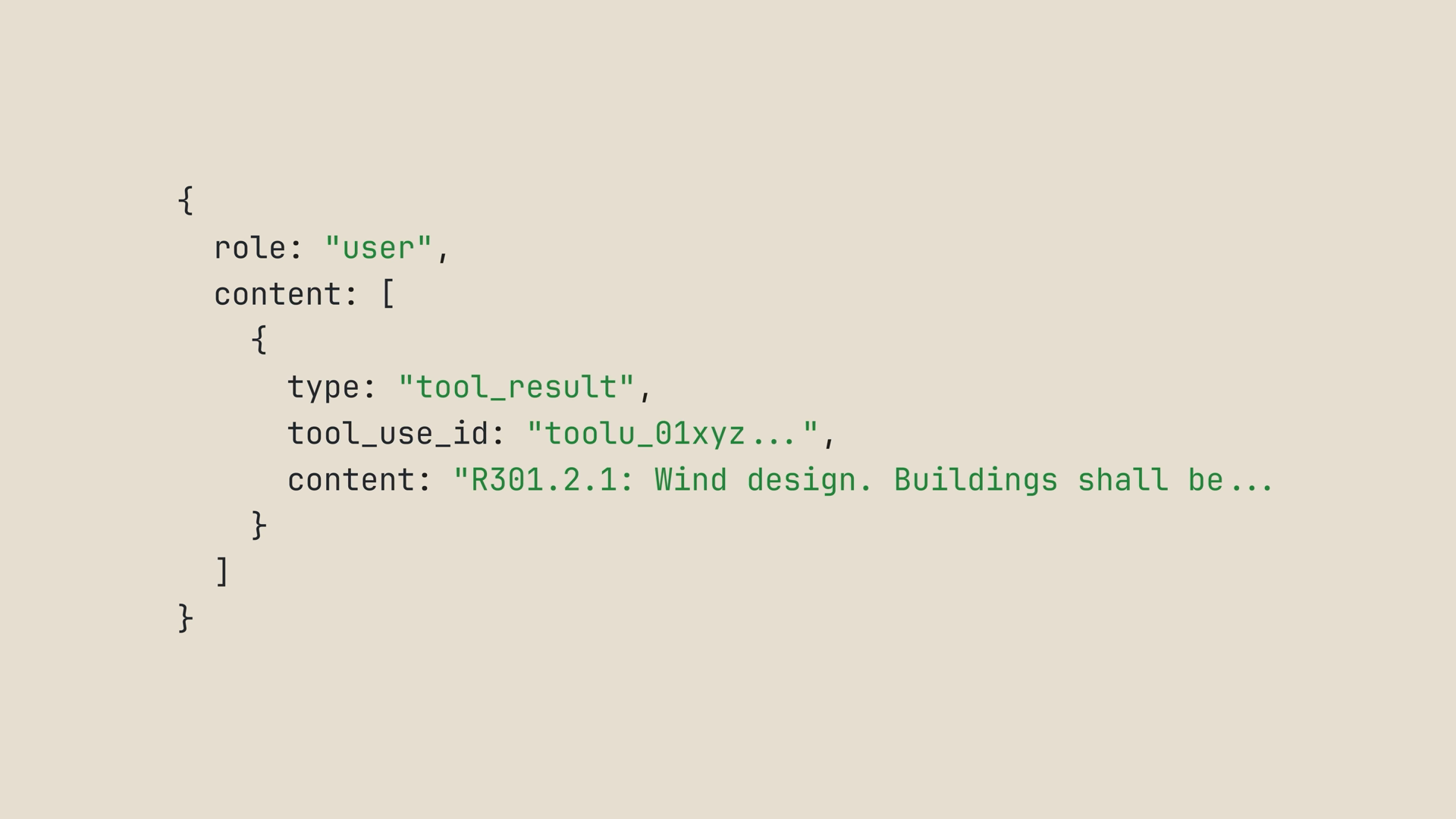
And Claude keeps going. At that point, we can keep calling tools and returning results to Claude until it has what it needs.
Multiple tools: letting Claude pick
One tool is useful, but the interesting part is giving Claude multiple tools and watching it pick which one to use, in what order.
Picture this scenario: you're packing for a three-day trip to Denver, and you want both today's weather and the forecast for the next few days. So we declare two tools instead of one:
The loop is identical to the agent loops we've already seen. The only new piece is a runTool function that dispatches on the tool name with a switch statement — this block of code is just where your code actually runs:
And that's the whole pattern. Want a third tool? Add it to the array, add a case to the switch, and you're done.
Run this, and you'll see Claude call get_weather and then get_forecast — sometimes in the same turn, sometimes one after the other. Then it answers: pack layers, expect snow flurries today, warming through the week.
Now notice how Claude chose. It read the descriptions, mapped your prompt to "today's weather" and "the next few days," and picked the right tool for each. That's why your tool descriptions really matter.
The tool runner: skip the boilerplate
You've probably already spotted two red flags with what we just wrote:
- That's a lot of code for two simple lookups.
- In a real codebase, you don't want to handwrite JSON schemas for every function you have. It's like writing your code twice.
That's where the tool runner comes in. It ships in beta in the Claude SDKs: TypeScript, Python, Ruby, C#, Go, Java, and PHP. You define each tool once, and the runner handles the entire tool use / tool result loop internally.
Your code shrinks down to: describe the tool, send the prompt, wait for the result. Here's the same two-tool weather demo wired through the tool runner:
Same scenario, a fraction of the code:
- No while loop, no stop reason switch, no manually pushing tool results back into messages — the runner handles all of that.
- No JSON schemas, so you don't write things twice.
- The two functions are the same lookups we ran by hand a minute ago, just plain TypeScript.
- Awaiting the runner returns the final assistant message once everything has settled.
Run it, and you get the same answer.
Real tools wrap your existing code
In real life, your tools wouldn't be hardcoded weather data. They'd wrap actual functions you already have in your application.
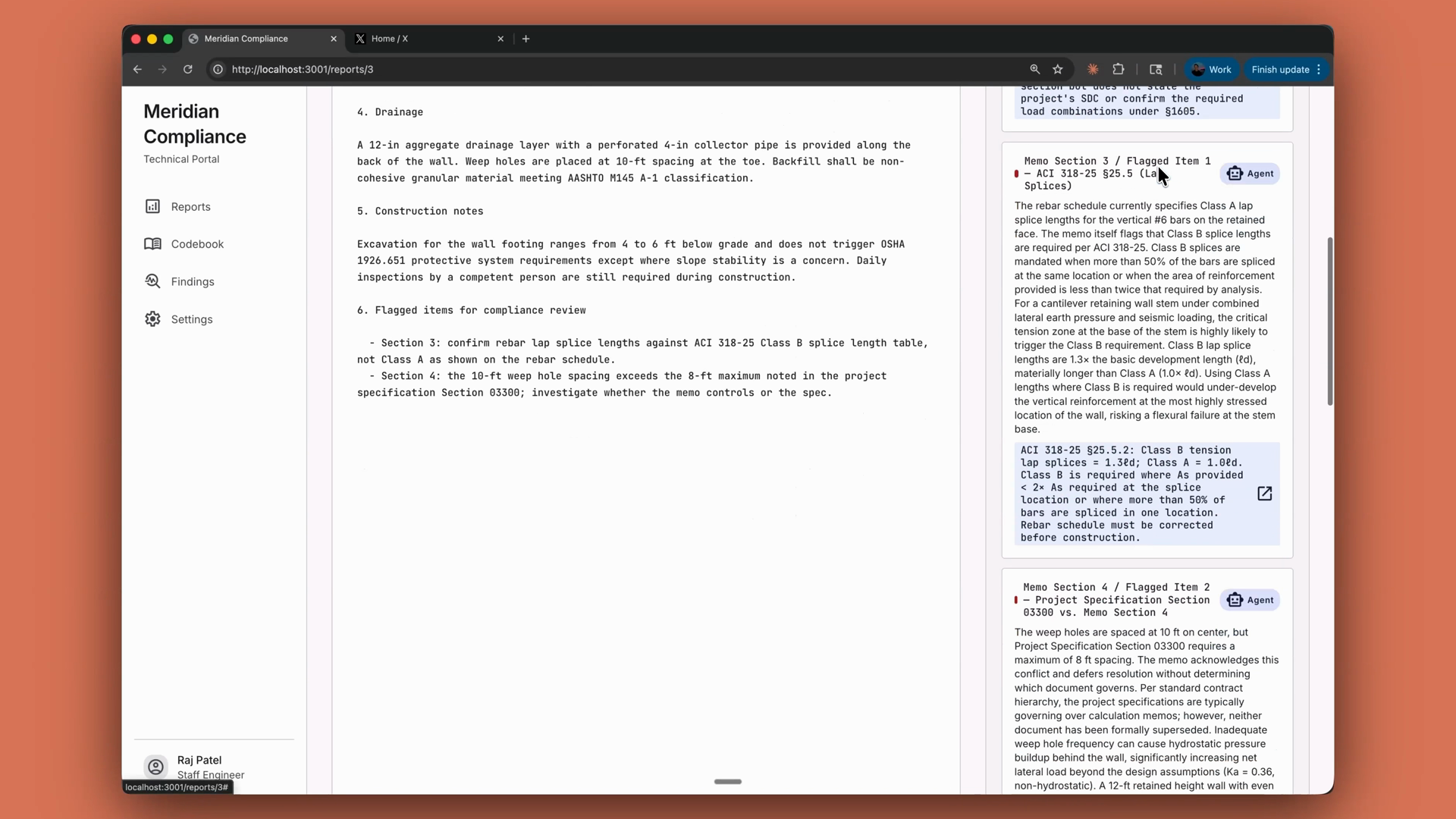
Take a compliance review agent: its tools are thin wrappers around lookup_building_code and search_building_code functions that already exist in the codebase. With the tool runner, you pass those functions in directly, and the agent cites specific code sections in every finding it writes — no schema writing required:
Recap
- Tools give Claude access to your systems. A tool is a function you define and expose; Claude decides when to call it, and your code executes it.
- Tools are JSON schemas with a name, a description, and an input schema, passed in the request as a
toolsarray. - Write specific descriptions. Vague descriptions are the number one reason agents misfire.
stop_reason: "tool_use"is your signal to run the tool and feed the result back as a tool result.- For multiple tools, dispatch on the tool name. Adding a tool means adding to the array and adding a case.
- The SDK's tool runner (available in beta across the Claude SDKs) builds schemas from your actual functions and handles the whole loop — or you can run the loop yourself.
- You execute, or you delegate the loop. At the far end of that spectrum, managed agents delegate the whole agent to Anthropic.