Building your first managed agent
If you've built an agent loop by hand, you know the drill: while loops, stop reason switches, tool executions. That works, and for a lot of features it's actually the right shape. But sometimes that loop is going to run for a very long time — minutes, maybe even hours — across many tools, with state to keep, files to write, and work to resume after a network hiccup. At that point, you don't want to run the loop on your server. You want to delegate it. That's what managed agents are.
한국어 대본
- 00:00우리는 에이전트 루프를 직접 만드는 것이 어떤 느낌인지 압니다.
- 00:06while 루프, 중지 사유 분기, 도구 실행 등 그 모든 것이 작동합니다.
- 00:11그리고 많은 기능에서 그것은 실제로 적합한 형태입니다.
- 00:13하지만 때로는 그 루프가 아주 오랫동안 실행될 것입니다.
- 00:16몇 분, 어쩌면 몇 시간, 유지해야 할 상태와 함께 많은 도구를 거치면서,
- 00:20작성할 파일, 네트워크 끊김 후 재개할 작업.
- 00:24그 시점에는 서버에서 루프를 실행하고 싶지 않습니다.
- 00:26그것을 위임하고 싶습니다.
- 00:28그리고 그것이 바로 관리형 에이전트입니다.
- 00:30관리형 에이전트는 자체 인프라가 아닌 Anthropic의 인프라에서 실행되는 에이전트 루프입니다.
- 00:36에이전트를 한 번 설명하고, 작업할 환경을 제공하고, 세션을 시작합니다.
- 00:42Anthropic이 루프를 실행하고, 작동하는 동안 이벤트를 다시 스트리밍하기만 하면 됩니다.
- 00:47그래서 여기에 네 가지 기본 요소가 순서대로 있습니다. 첫째, 에이전트가 있습니다. 에이전트는 페르소나,
- 00:52모델, 시스템 프롬프트, 도구 세트입니다. 이것은 여러 실행에 걸쳐 재사용할 수 있습니다.
- 00:57그다음에는 에이전트가 실행되는 환경이 있습니다: 클라우드, 로컬, 네트워킹 구성 등.
- 01:03그다음에는 세션이 있습니다. 세션은 특정 환경 안에서 에이전트의 단일 실행입니다.
- 01:08그리고 나서 이벤트가 있습니다. 이벤트는 들어오는 메시지(즉, 프롬프트)와 나가는 메시지입니다.
- 01:13에이전트의 행동, 도구 호출, 결과, 응답.
- 01:17그래서 여기서는 while 루프를 실행하는 것이 아니라 이벤트를 보내고 이벤트를 읽는 것입니다.
- 01:22저는 무언가를 하는 가장 작은 관리형 에이전트를 원합니다.
- 01:26그럼 임시 드라이브에 파일을 만들고, 줄 수를 세고, 결과를 보고하겠습니다.
- 01:31그리고 그것은 에이전트 도구 세트를 사용합니다.
- 01:33Anthropic에 번들로 포함된 file/bash/web 도구가 잘 작동할 것입니다.
- 01:36그래서 제가 도구를 직접 정의할 필요가 없습니다.
- 01:39그래서 먼저 여기에서 에이전트를 생성합니다.
- 01:42참고로 바로 여기에 에이전트 도구 세트가 정의되어 있습니다.
- 01:45그것이 번들 도구 세트입니다.
- 01:46그런 다음 환경을 생성합니다.
- 01:48이것이 컨테이너 템플릿을 실행합니다.
- 01:50클라우드, 네트워킹, 무제한.
- 01:52이것이 파일이 실제로 기록되는 샌드박스입니다.
- 01:55그런 다음 에이전트, 환경, 그리고 선택적 제목과 함께 세션을 생성합니다.
- 02:00그리고 세션은 작업 단위입니다.
- 02:03그런 다음 이벤트 스트림을 엽니다.
- 02:05이것을 먼저 한다는 점을 주목하세요.
- 02:07스트림은 열린 후에 발생하는 이벤트만 전달하므로, 항상 보내기 전에 열어야 합니다.
- 02:11킥오프를.
- 02:12그리고 그때 사용자 메시지를 라이브 스트림으로 보냅니다.
- 02:16이벤트, 복수형이라는 점을 주목하세요.
- 02:18이 API에서는 모든 것이 이벤트로 흐릅니다.
- 02:21그런 다음 스트림을 소비합니다.
- 02:23여기에 이 데모에서 중요한 세 가지 이벤트 유형이 있습니다.
- 02:27첫째, Claude의 텍스트인 agent.message가 있습니다.
- 02:30그다음에는 Claude가 선택한 도구인 agent.toolUse가 있습니다.
- 02:35그리고 session.statusIdle이 있습니다. 이것은 에이전트가 작업을 마쳤을 때입니다.
- 02:39그럼 실행해 봅시다.
- 02:40보시다시피, 출력은 에이전트가 소리 내어 추론하는 내용입니다.
- 02:44여기에는 실제 텍스트와 에이전트가 선택한 도구, 그리고 최종 답변이 있습니다.
- 02:48그리고 이 모든 것은 Anthropix 컨테이너 안에서 실행됩니다.
- 02:51관리형 에이전트는 모든 API 계정에 기본적으로 활성화되어 있습니다,
- 02:54특별한 접근 권한이 필요하지 않습니다.
- 02:56그리고 이것이 바로 그 대가입니다.
- 02:57일반적으로 에이전트를 사용할 때는 우리만의 루프가 있습니다.
- 03:00그 루프에서는 모든 것을 통제해야 합니다.
- 03:02하지만 관리형 에이전트를 사용하면 그 루프를 위임하기만 하면 됩니다.
- 03:05샌드박스, 재개 가능성,
- 03:07그리고 들어오는 이벤트 스트림을 그냥 소비하면 됩니다.
- 03:12그래서 프로덕션 앱에서는,
- 03:13이것이 장기 실행되는 파일 처리 작업을 위한 형태입니다,
- 03:16'가서 이걸 정리해 줘' 같은 작업.
- 03:19그래서 이 파일 공유 정리 작업에서,
- 03:20관리형 에이전트는 대상 디렉터리 구조 명세를 읽고, 지저분한 수신 폴더를 탐색하며,
- 03:26파일을 올바른 프로젝트 폴더로 이동하고, 중복 파일과 0바이트 쓰레기를 보관 처리하며,
- 03:31그런 다음 자신 있게 배치할 수 없는 항목은 표시합니다,
- 03:34모두 수천 개의 파일을 대상으로 몇 분 동안 실행될 수 있는 세션에서 이루어집니다.
- 03:39관리형 에이전트는 에이전트 루프를 대신 실행해 주는 것입니다.
- 03:42에이전트를 만들고, 환경을 만들고, 세션을 만들고, 이벤트를 보내고, 이벤트를 스트리밍으로 수신합니다.
- 03:48루프가 너무 오래 실행되거나, 너무 많은 작업을 하거나, 일시적인 문제를 견뎌야 할 때는 관리형 에이전트를 사용하고,
- 03:53그런 다음 완전한 제어가 필요할 때는 수동 루프를 사용하세요.
What is a managed agent?
A managed agent is an agent loop that runs on Anthropic's infrastructure instead of yours. You describe the agent once, you give it an environment to work in, and you start a session. Anthropic runs the loop, and you just stream the events back out as it works.
Managed agents are enabled by default for every API account — no special access needed.
The four primitives
There are four primitives, and they come in order:
- Agent — the persona: model, system prompt, and toolset. This is reusable across many runs.
- Environment — where the agent runs: cloud or self-hosted, networking config, and so on.
- Session — a single run of an agent inside a certain environment. The session is the unit of work.
- Events — the messages flowing in and out: the agent's actions, the tool calls, the results, the replies.
Here's how the pieces fit together: your app talks to a session, the session drives work inside the environment, and everything that happens flows back out through the event stream:
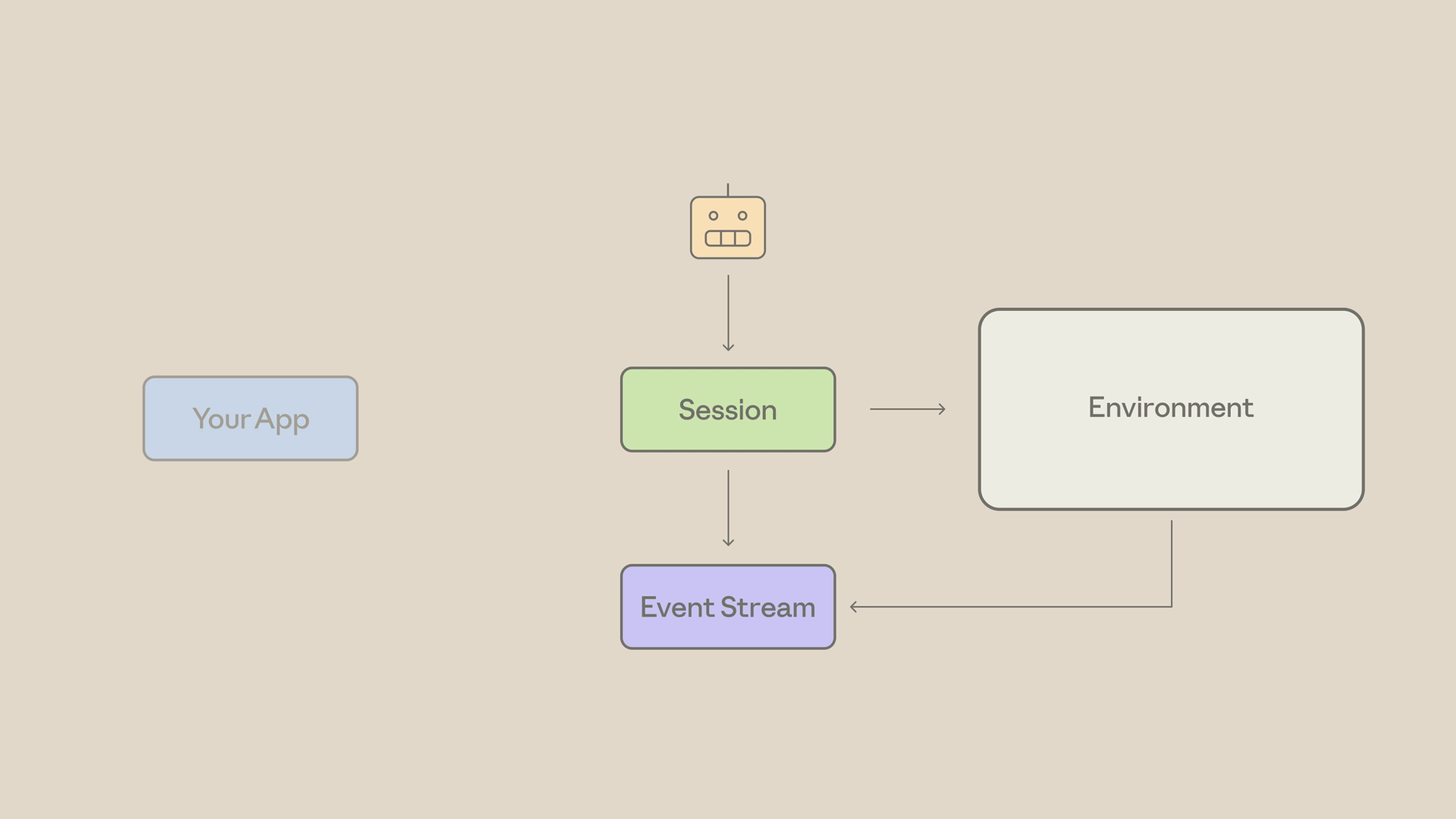
Notice the shift here: you're not running a while loop. You're sending events and reading events.
The smallest possible managed agent
Let's build the smallest managed agent that does something useful: create a file in the temp drive, count its lines, and report back.
For tools, we'll use the agent toolset — Anthropic's bundled file, bash, and web tools. They work fine for this task, so we don't have to define any tools ourselves.
Step 1: Create the agent
First, we create the agent. Note the agent toolset defined right in the tools array — that's the bundled toolset:
Remember: the agent is reusable. Create it once and run it across many sessions.
Step 2: Create the environment
Next, the environment. This spins up the container template — cloud, with unrestricted networking. This is the sandbox where the file actually gets written:
Step 3: Create the session
Then we create a session with our agent and environment, plus an optional title. The session is the unit of work:
Step 4: Open the stream, then send the kickoff
Now we open the event stream — and notice that we do this first. The stream only delivers events that occur after it opens, so always open it before sending the kickoff message. Then we send the user message into the live stream:
Notice it's events — plural. Events are how everything flows in this API.
Step 5: Consume the stream
Finally, we consume the stream. There are three event types that matter for this demo:
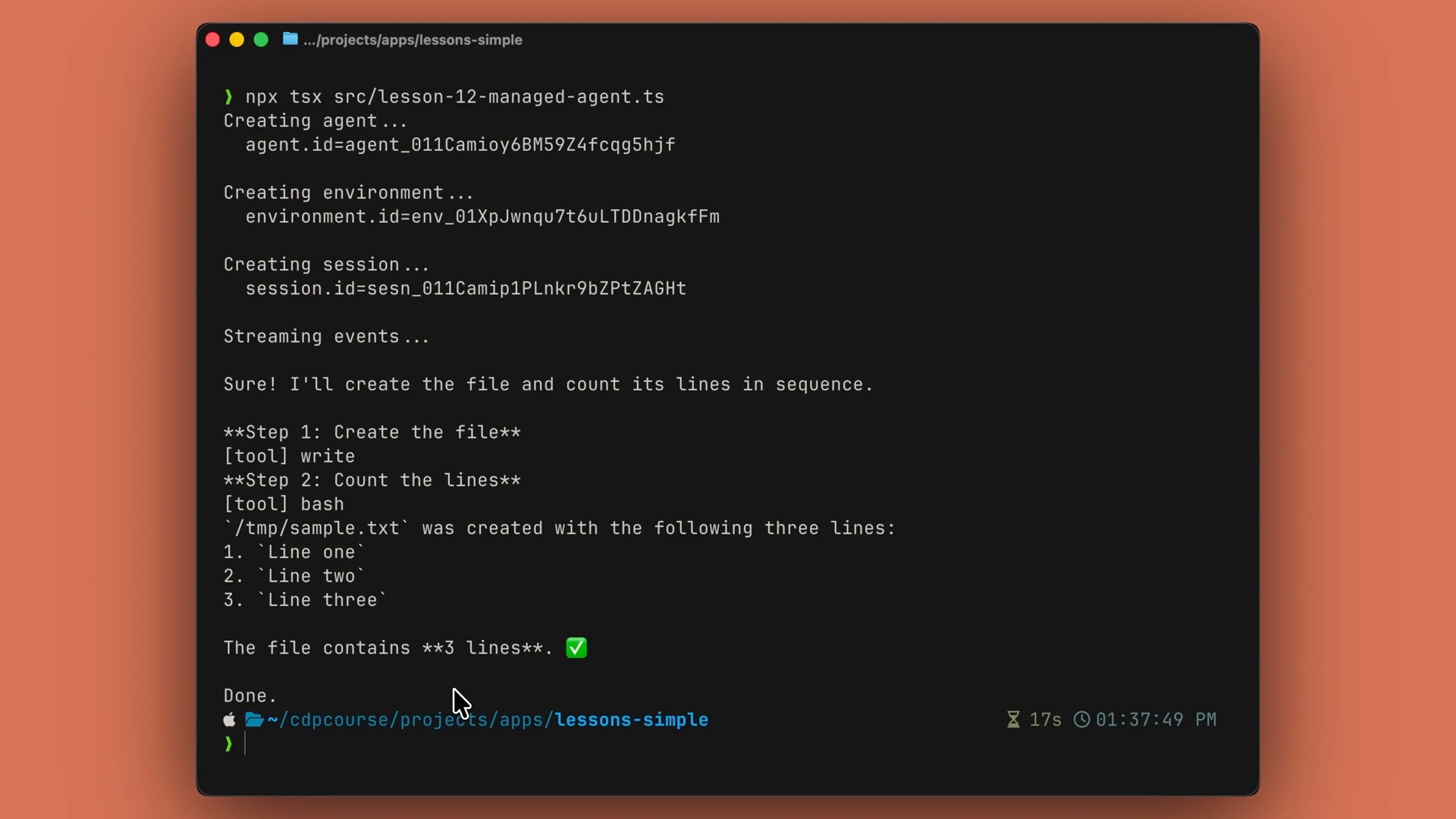
agent.message— Claude's textagent.tool_use— what tool Claude pickedsession.status_idle— the agent is done
Run it, and the output is the agent reasoning out loud — actual text, the tools it picks, and a final answer. All of it running inside Anthropic's container, not yours:
The trade
Usually with agents, we have our own loop where we have to control everything. With managed agents, you delegate that loop, the sandbox, and the resumability — and just consume the event stream as it comes in.
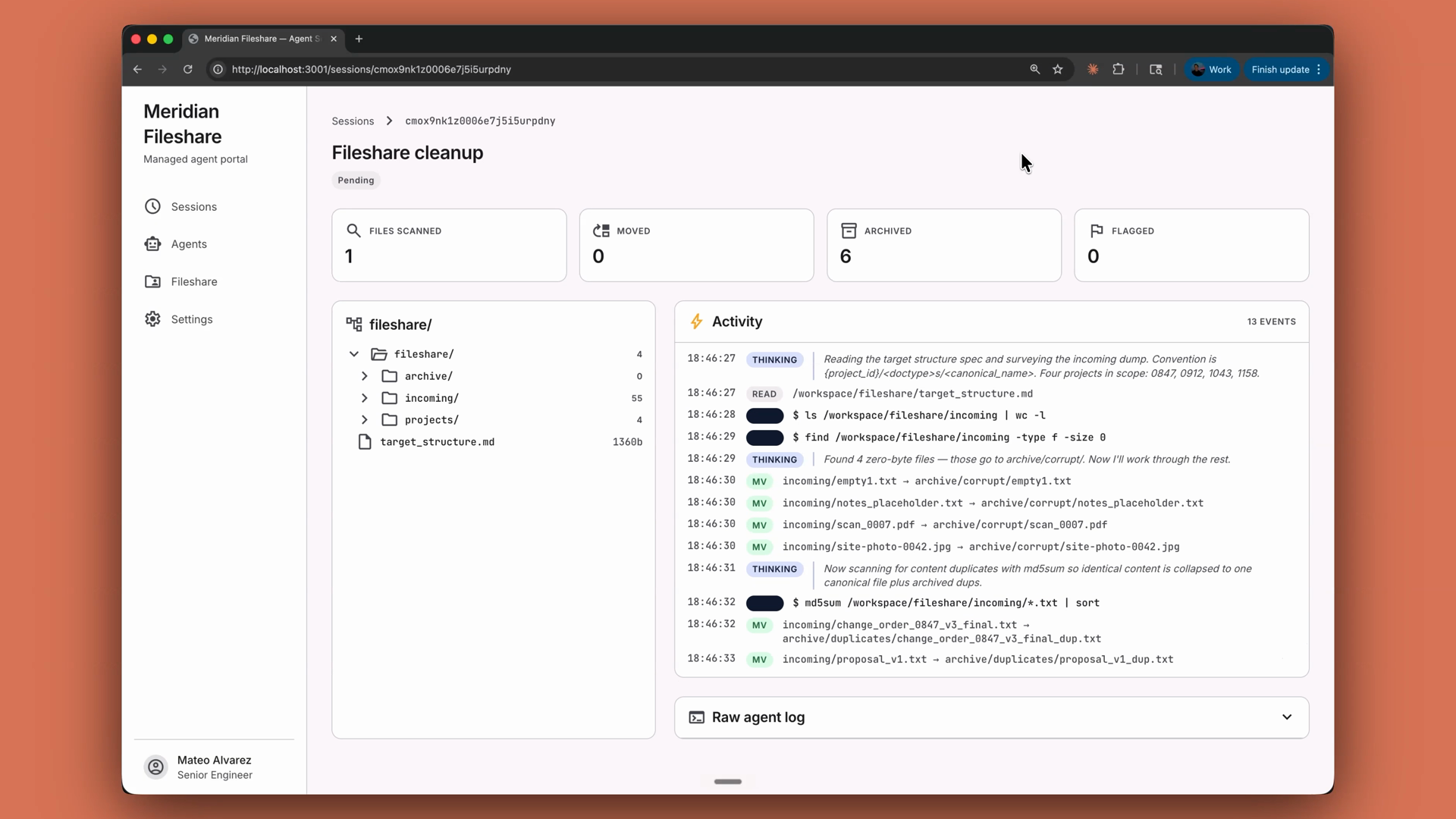
In a production app, this is the shape for long-running, file-touching, "go organize this for me" tasks. Picture a file share cleanup: a managed agent reads a target directory structure spec, walks the messy incoming folder, moves files into the right project folders, archives duplicates and zero-byte garbage, and flags anything it can't confidently place — all in a session that can run for minutes against thousands of files. Here's what that looks like in a real app — a fileshare cleanup dashboard streaming the agent's activity live as it sorts, archives, and flags files:
Recap
- Managed agents are the agent loop, run for you — on Anthropic's infrastructure instead of your server.
- The flow is: create an agent, create an environment, create a session, send events in, and stream events out.
- The agent (model, system prompt, toolset) is reusable across runs; the session is a single run; events are how everything flows.
- Open the event stream before sending your kickoff message — it only delivers events that occur after it opens.
- Watch for three events:
agent.message(text),agent.tool_use(tool picks), andsession.status_idle(done). - Reach for managed agents when the loop would run too long, do too much, or need to survive a hiccup. Reach for a manual loop when you want full control.