What are managed agents?
Claude Managed Agents is a suite of APIs for building and deploying agents at scale. You define agents with specific tools, personas, and capabilities. You configure sandbox environments with the right packages and network controls. Then you fire off sessions from your own application, and Claude does the work inside an isolated container with full file system access, bash execution, and web search.
한국어 대본
- 00:00Claude Managed Agents는 에이전트를 대규모로 구축하고 배포하기 위한 API 모음입니다.
- 00:07특정 도구, 페르소나, 기능을 갖춘 에이전트를 정의하고 샌드박스 환경을 구성합니다.
- 00:17필요한 패키지와 네트워크 제어를 설정한 뒤, 자체 애플리케이션에서 세션을 실행하면
- 00:23Claude가 완전한 파일 시스템 접근 권한과 bash 실행, 웹 검색이 가능한 격리된 컨테이너 안에서 작업합니다.
- 00:28내부적으로는 에이전트 루프입니다. Claude가 추론하고 도구를 호출한 다음,
- 00:35결과를 읽고 작업이 끝날 때까지 반복합니다. 이런 종류의 루프는 이전에도 직접 구축했지만
- 00:40managed agents는 같은 루프를 가져와 Anthropics의 인프라에서 호스팅합니다.
- 00:46여기 managed agents 위에 구축한 Kanban 보드가 있습니다. 항목 하나를
- 00:51진행 중으로 옮기면 세션이 자동으로 실행됩니다. 이제 티켓에는 웹사이트 성능 최적화라고 적혀 있습니다.
- 00:56그러면 백엔드가 세션을 생성합니다. 미리 Lighthouse와 Puppeteer를 설치해 둔 환경을 가리키고
- 01:02Lighthouse와 Puppeteer가 미리 설치된 환경으로 구성하고, 내 GitHub 리포지토리를 그 컨테이너에
- 01:08마운트합니다. Claude에는 코드베이스와 도구, 평가 기준이 있습니다. Lighthouse 점수는 90을 넘어야 합니다.
- 01:14렌더링을 차단하는 리소스가 없어야 합니다. 모든 이미지는 지연 로드되어야 합니다. 그러면 여기서 Claude가
- 01:19감사를 실행합니다. 이미지 압축을 시작하고 CSS를 인라인으로 넣고 스크립트를 지연합니다. 모든 도구 호출은
- 01:26이벤트 스트림을 통해 실시간으로 보드에 스트리밍됩니다. 그러면 평가 기준이 작동하고, 별도의
- 01:32자체 컨텍스트 창에서 실행되는 평가자가 내 기준에 따라 출력을 평가합니다. Claude는 그
- 01:37피드백을 읽고 다시 작업에 들어가 놓친 부분을 수정한 다음 다시 제출합니다. 좋습니다. 이제 96점입니다. 그리고
- 01:46첫 번째 세션이 아직 실행 중일 때 두 번째 티켓을 옮길 수 있다는 점에 주목하세요. 세션 두 개, 컨테이너 두 개,
- 01:51서로 다른 작업 두 개가 병렬로 실행됩니다.
- 01:55여기 또 다른 에이전트가 있습니다.
- 01:56이 에이전트의 작업은 가격을 추적하고
- 01:58회사가 비용을 지불하는 모든 SaaS 도구의
- 02:01변경 사항을 계획하는 것입니다.
- 02:03그리고 스탠드업 전에 보고서를 준비합니다.
- 02:06흔한 일입니다.
- 02:08Claude가 현재 가격 페이지를 웹에서 검색하고,
- 02:10요금제 등급 변경을 확인하고,
- 02:11계약에 영향을 줄 수 있는 새 기능을 표시합니다.
- 02:14그런 다음 Python으로 비용 분석을 실행합니다.
- 02:16그 샌드박스 안에서 말입니다.
- 02:18또한 Excel 스프레드시트 스킬을 사용하고
- 02:20경영진 요약을 작성합니다.
- 02:22보고서가 준비되면,
- 02:23Claude가 Slack에 링크를 게시하고
- 02:24Asana에 검토 작업을 생성합니다.
- 02:27둘 다 MCP 서버를 통해 처리합니다.
- 02:29에이전트는 또 읽고
- 02:30메모리 저장소에 기록합니다.
- 02:33시작하기 전에,
- 02:34지난주에 무엇을 찾았는지 확인합니다.
- 02:36작업을 마친 뒤에는,
- 02:37저장된 내용이 변경됩니다.
- 02:38그래서 다음 월요일 보고서에는
- 02:40클라우드 컴퓨팅 비용이
- 02:41지난주보다 15% 낮아졌다고
- 02:43같은
- 02:45정적인 가격 데이터만 나열하는 대신 표시됩니다.
- 02:47여기에 경고가 하나 있습니다.
- 02:48모니터에서 발생한 경고입니다.
- 02:50스택입니다. 백엔드의 custom tool이 경고 페이로드를 받아 새 세션으로 보내며
- 02:55도구 결과로 전달합니다. 이 세션은 멀티에이전트 조정을 사용합니다. 코디네이터 에이전트가
- 03:01경고를 받고 세 명의 전문가에게 위임합니다. 각 전문가는 같은
- 03:05공유 파일 시스템에서 자체 컨텍스트 창으로 실행됩니다. 전문가들이 결과를 보고하면 코디네이터가 그 결과를
- 03:13하나의 인시던트 요약으로 종합합니다. 그리고 Slack에 업데이트를 게시하기 전에 권한 정책이 작동합니다.
- 03:18그러면 화면에서 초안을 확인하고 승인하면 메시지가 전송됩니다.
- 03:23메모리가 이 모든 내용을 연결합니다.
- 03:25코디네이터가 메모리 저장소에서 과거 인시던트를 확인하고 패턴을 표시합니다.
- 03:29이것은 잘못 구성된 TTL 때문에 발생한 2주 전 DNS 확인 문제와 비슷합니다.
- 03:35따라서 다음에 유사한 경고가 발생하면 에이전트가 처음부터 진단하는 대신 이 컨텍스트로 시작합니다.
- 03:42managed agents는 개발자에게 완전히 관리되는
- 03:49상태를 유지하는 에이전트 경험을 제공하는 도구를 줍니다. 에이전트, 세션, 환경, 도구, MCP, 메모리, 결과, 그리고
- 03:56멀티에이전트 조정을 포함합니다. 완료의 기준을 정의하면 Claude는 거기에 도달할 때까지 작업합니다.
The agent loop, hosted for you
Under the hood, this is an agent loop: Claude reasons, calls a tool, reads the result, and repeats until the job is done. If you've built agents before, you've probably written this kind of loop yourself. Managed agents takes that same loop and hosts it on Anthropic's infrastructure, so you don't have to run it.
You'll find Managed Agents in its own section of the Claude Console.
The best way to understand what this unlocks is to walk through a few examples.
Example 1: A Kanban board that does the work
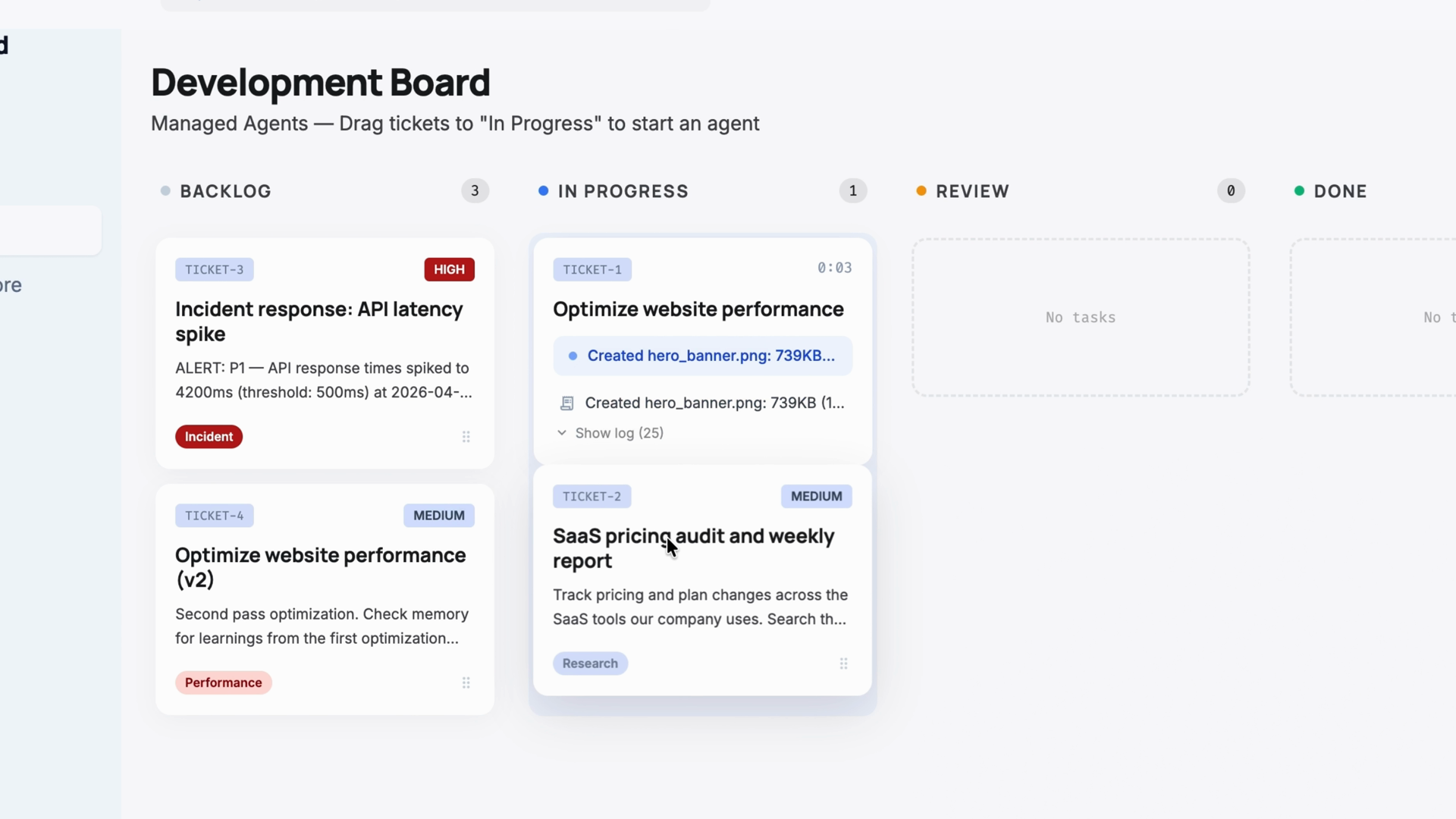
Picture a Kanban board sitting on top of managed agents. You drag a ticket into the "in progress" column, and that fires off a session automatically. Say the ticket reads "optimize website performance." Here's what happens:
- Your back end creates a session.
- The session points to an environment you configured with Lighthouse and Puppeteer pre-installed.
- Your GitHub repo gets mounted into the container.
Now Claude has the codebase, the tools, and a rubric that defines what done looks like:
- Lighthouse score above 90
- No render-blocking resources
- All images lazy loaded
Claude runs the audit, then starts compressing images, inlining CSS, and deferring scripts. Every tool call streams back to the board in real time through the event stream, so you can watch the work as it happens.
Then the rubric kicks in. A separate grader, running in its own context window, evaluates the output against your criteria. Claude reads that feedback, goes back in, fixes what it missed, and resubmits. In the demo, that loop takes the Lighthouse score up to 96.
One more thing: you can drag a second ticket over while the first is still running. Two sessions, two containers, two separate tasks running in parallel.
Example 2: A recurring research agent with memory
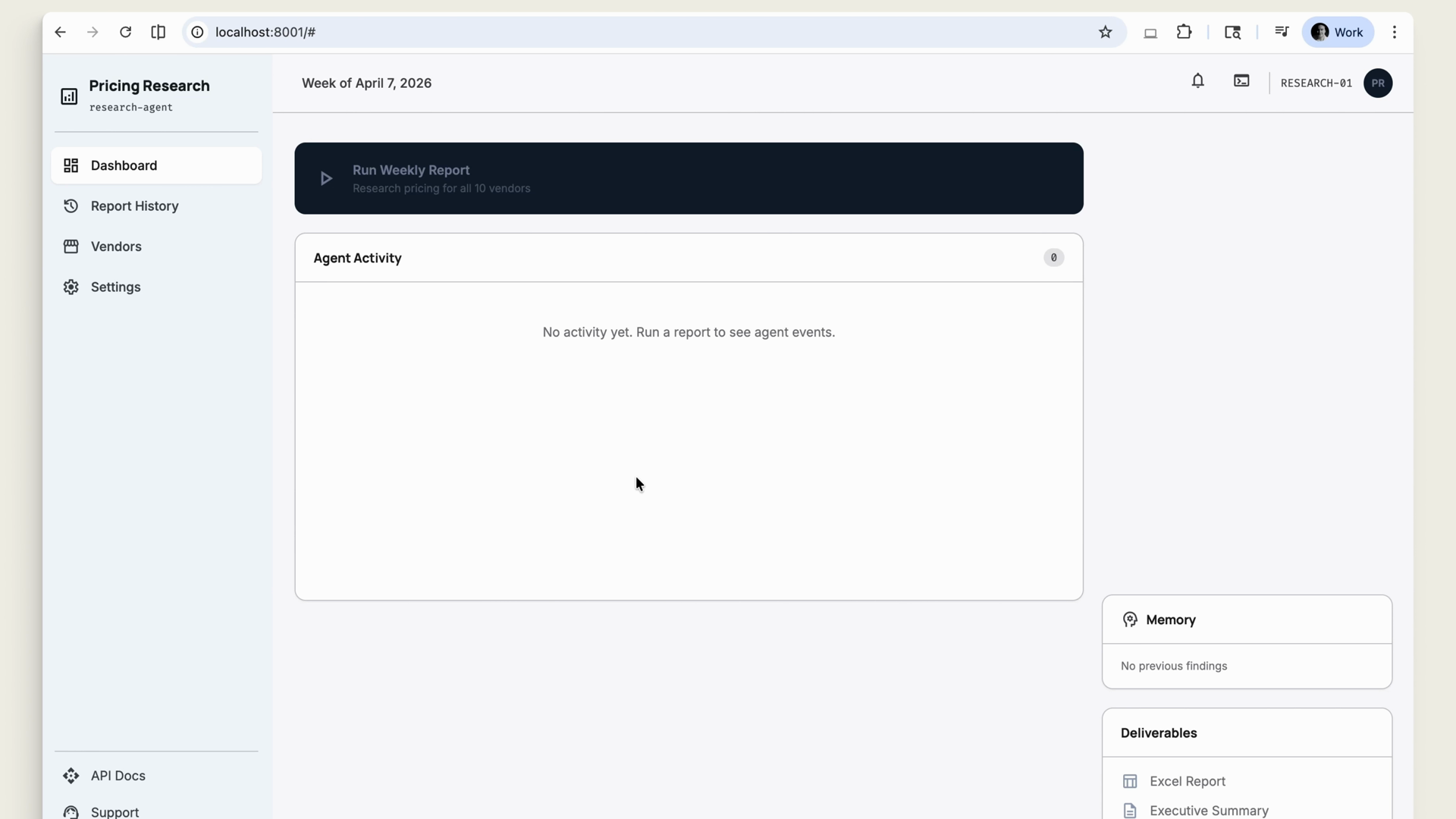
Here's a different shape of agent: one whose job is to track prices and plan changes across every SaaS tool your company pays for, with a report ready before stand-up.
On each run, the agent:
- Searches the web for current pricing pages, checks for plan tier changes, and flags new features that might affect your contracts
- Runs a cost analysis in Python inside the sandbox
- Uses an Excel spreadsheet skill and writes an executive summary
- Posts a link to Slack and creates a review task in Asana, both through MCP servers
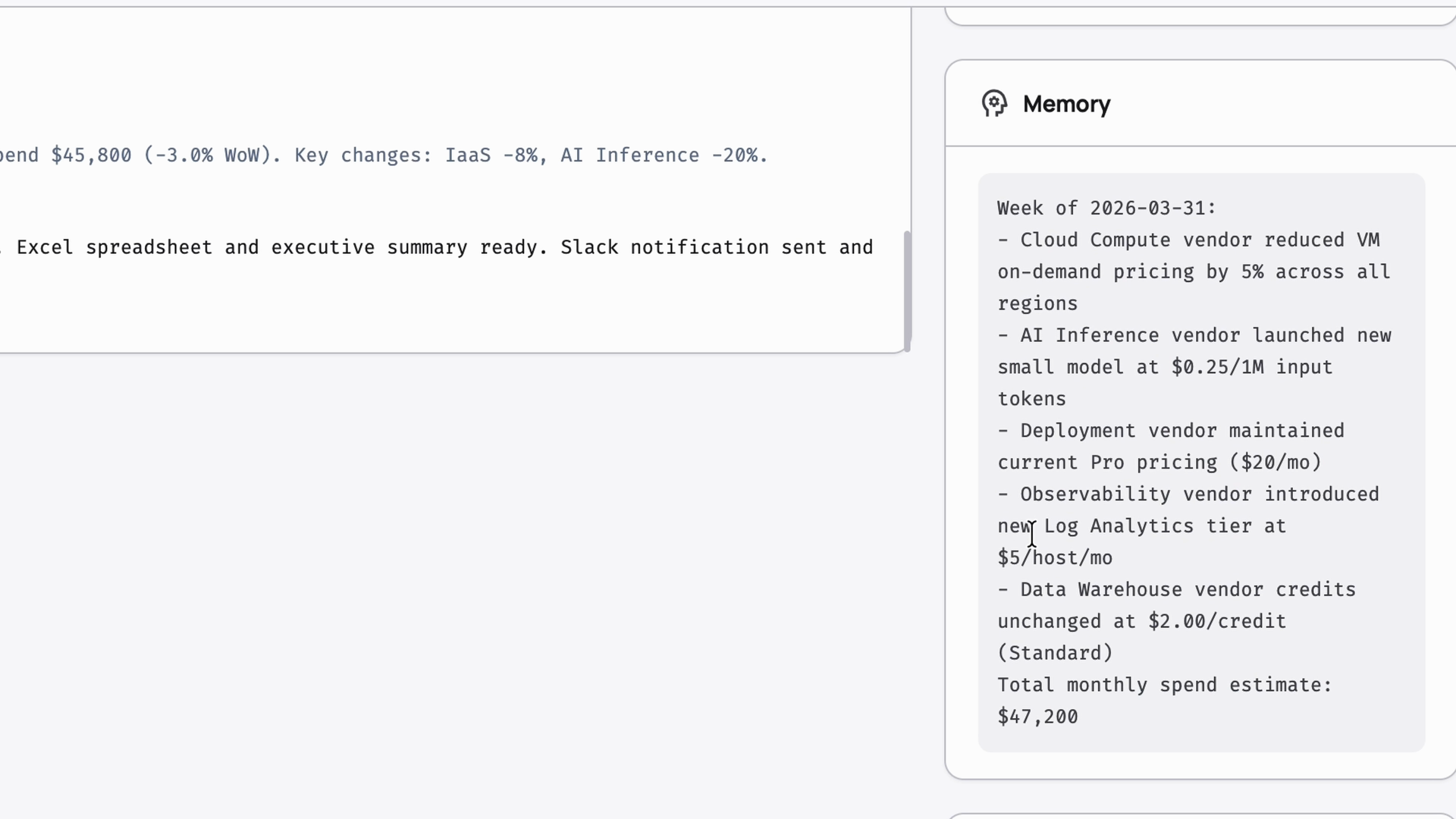
The agent also reads from and writes to a memory store. Before it starts, it checks what it found last week. After it finishes, it stores what changed. So next Monday's report can say "compute costs are 15% lower since last week" instead of listing the same static pricing data every time.
Example 3: Incident response with multiple agents
Now imagine an alert fires from your monitoring stack. A custom tool on your back end receives the alert payload and sends it into a new session as a tool result. This session uses multi-agent coordination:
- A coordinator agent receives the alert and delegates to three specialists.
- Each specialist runs in its own context window on the same shared file system.
- The specialists report back, and the coordinator synthesizes their findings into a single incident summary.
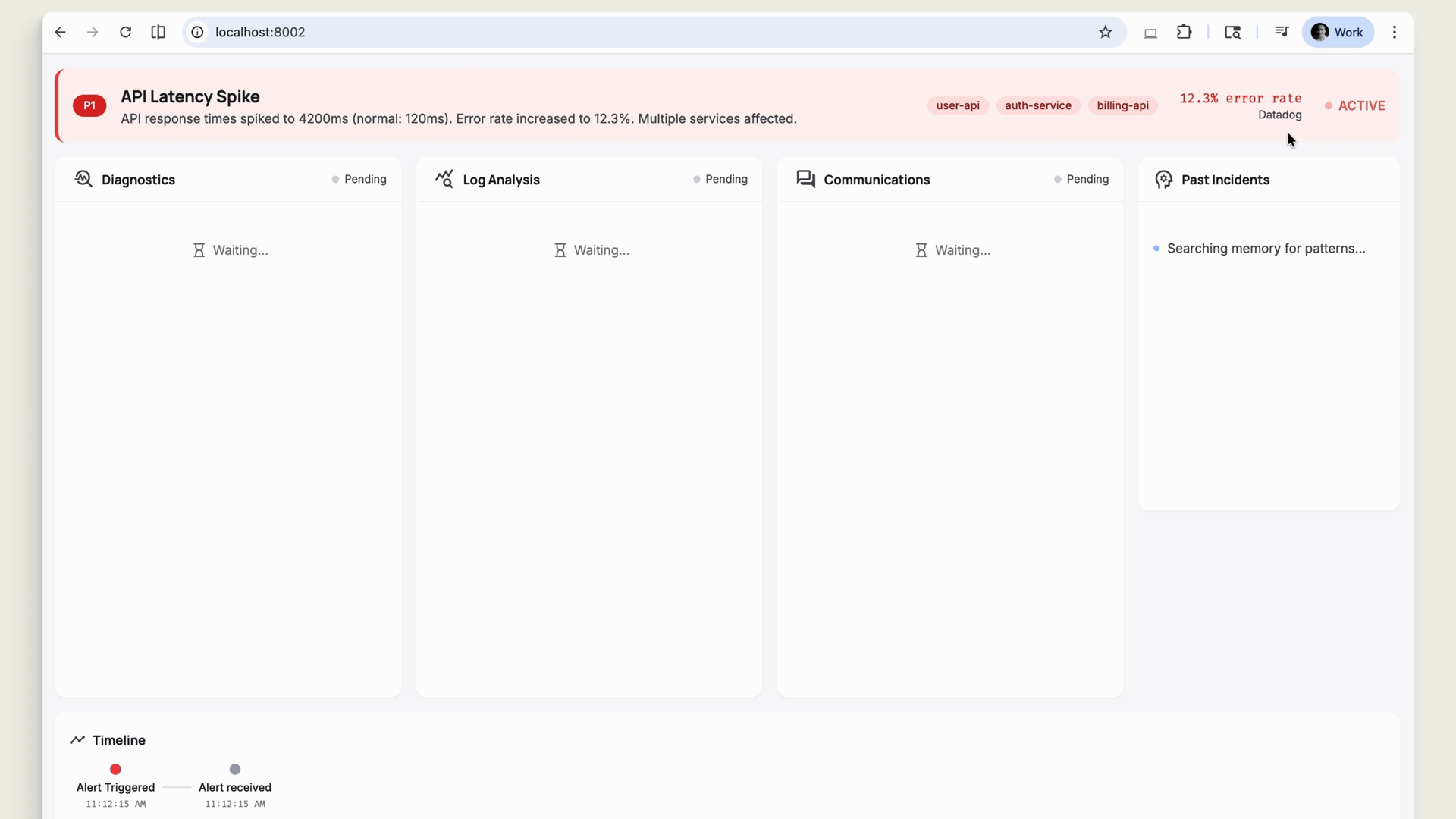
Before the summary goes to Slack, the permissions policy fires. You see the draft on screen, approve it, and the message goes out. Sensitive actions wait for a human.
Memory ties all of this together. The coordinator checks past incidents in the memory store and flags a pattern: "this looks like the DNS resolution issue from two weeks ago that was caused by a misconfigured TTL." The next time a similar alert fires, the agent starts with that context instead of diagnosing from scratch.
The building blocks
Across these examples, managed agents gives developers the tools to deliver a fully managed, stateful agent experience built on:
- Agents — definitions with specific tools, personas, and capabilities
- Sessions — individual runs you fire off from your own application
- Environments — sandboxes with the right packages and network controls
- Tools — including custom tools on your back end
- MCP — connections to services like Slack and Asana
- Memory — a store the agent reads before starting and writes to when done
- Outcomes — rubrics and graders that define and check what done looks like
- Multi-agent coordination — coordinators delegating to specialists
Recap
- Claude Managed Agents is a suite of APIs for building and deploying agents at scale, hosted on Anthropic's infrastructure.
- It runs the familiar agent loop — reason, call a tool, read the result, repeat — inside an isolated container with file system access, bash execution, and web search.
- Sessions run in environments you configure, work in parallel, and stream tool calls back to your app in real time.
- Rubrics and separate graders let you define success criteria; Claude iterates until it meets them.
- Memory, MCP servers, custom tools, permissions policies, and multi-agent coordination round out the stateful agent experience.
- You define what done looks like. Claude works until it gets there.