The agent loop explained
You've made API calls, but a single call only returns one response. If you want to automate a workflow, Claude needs to act, look at the result, decide what's next, and keep going. That pattern is what people mean when they talk about agentic workflows.
한국어 대본
- 00:00API를 호출해도 단일 호출은 응답 하나만 반환합니다.
- 00:06워크플로를 대체하려면 Claude가 직접 행동해야 합니다.
- 00:10결과를 보고 다음 일을 결정하며 계속 진행하세요.
- 00:13이것을 흔히 에이전트형 워크플로라고 합니다.
- 00:17에이전트는 자율적으로 작동하는 Claude 버전으로,
- 00:20사람의 개입 없이 메시징 루프의 양쪽을 모두 실행합니다.
- 00:24에이전트는 작업을 받고 도구를 선택한 뒤,
- 00:26Claude가 작업이 끝났다고 판단할 때까지 루프에서 코드를 실행합니다.
- 00:31에이전트 루프를 구현하는 가장 쉬운 방법은 다음과 같습니다.
- 00:33먼저 사용 가능한 도구와 함께 Claude에 메시지를 보내세요.
- 00:37그러면 Claude는 최종 답변을 반환하거나 직접 정의한 도구를 사용합니다.
- 00:43그런 다음 코드가 해당 도구를 실행합니다.
- 00:46그리고 그 결과를 Claude에 다시 보냅니다.
- 00:49중지 이유가 `end_turn`이 될 때까지 이 과정이 반복됩니다.
- 00:52데이터베이스나 UI를 끌어들이지 않고 이 루프가 처음부터 끝까지 실행되는 모습을 보고 싶으므로,
- 00:59가짜 도구 `getWeather`를 연결하고 오늘 Austin에서 무엇을 입어야 할지 Claude에 묻겠습니다. Claude는
- 01:05스스로 날씨를 알 방법이 없으므로 도구를 호출하고 결과를 읽은 다음
- 01:09답변을 제공해야 합니다. 전체 스크립트는 다음과 같습니다. 먼저 `tools` 배열은 Claude가 이용할 수 있는 항목을 알려 줍니다.
- 01:14이름, 설명, 입력에 대한 JSON 스키마가 들어 있습니다. `Run tool`은 하드코딩된 조회일 뿐입니다.
- 01:24실제 앱이라면 데이터베이스, API 등 무엇이든 여기에 연결할 것입니다. 그리고 여기의 루프가 에이전트
- 01:29루프입니다. 각 반복에서 Claude에 메시지를 보내고 응답의 `stop_reason`에 따라 분기합니다. 그리고
- 01:36응답이 `end_turn`이면 Claude의 작업이 끝난 것이므로 최종 텍스트를 출력하고 중단합니다. 하지만 도구 사용인 경우에는
- 01:42응답에서 도구 사용 블록을 찾아 각각 실행한 뒤, 어시스턴트 응답을
- 01:47도구 결과를 `messages`에 다시 추가하고 루프를 반복하면 Claude가 답변할 수 있습니다.
- 01:51실행해 보겠습니다. 두 턴이 표시됩니다. 첫 번째 턴의 중지 이유는 도구 사용입니다.
- 01:59Claude가 날씨를 요청하고, 이 경우에는 Austin의 날씨입니다. 코드가 `Temperature`와
- 02:04기상 조건을 반환합니다. 두 번째 턴의 중지 이유는 `end_turn`입니다. 그러면 Claude는
- 02:10가볍고 통기성 좋은 옷을 입으라고 말합니다. API 호출 두 번, 도구 실행 한 번, 최종 답변 하나입니다.
- 02:15이것이 전체 루프입니다. Claude API로 만드는 것은 무엇이든 이와
- 02:20비슷한 구조를 갖습니다. 실제 환경에서는 이와 같은 루프가 자동 검토 엔드포인트나,
- 02:26구조 보고서를 읽고 관련 건축 법규를 도구로 조회하는 컴플라이언스 에이전트를 구동하며,
- 02:30작업하면서 위험 발견 사항을 하나씩 데이터베이스에 기록합니다.
- 02:36루프의 형태는 방금 실행한 것과 동일합니다. 차이점은 모의 날씨 조회 대신 실제 도구를 사용하고,
- 02:41결과를 서버 전송 이벤트로 UI에 스트리밍하며, 발견 사항을
- 02:47risk-finding 테이블에 저장한다는 점입니다. 에이전트는 루프 안에서 작동하는 Claude입니다. 관찰하고, 결정하고, 행동하고, 반복합니다. 루프와
- 02:56도구는 직접 관리하고, 추론은 Claude가 맡습니다. 루프를 직접 관리하고 싶지 않다면 관리형 에이전트가
- 03:02Anthropic의 인프라에서 이 작업을 정확히 대신 실행합니다.
What an agent actually is
An agent is an autonomous version of Claude, running both sides of the messaging loop without a human in the middle. An agent receives a task, picks a tool, and executes code in a loop until Claude decides the task is done.
The easiest way to implement an agent loop looks like this:
- Send a message to Claude with tools available.
- Claude responds with either a final answer or a request to use a tool you defined.
- Your code executes that tool.
- You send the result back to Claude.
- Repeat until the stop reason is
end_turn.
Think of it as a conversation where the turns alternate: the user kicks things off, the agent calls a tool, the tool returns a result, and the agent keeps going until it has an answer.
A minimal working example
To see this loop run end to end without dragging in a database or a UI, we'll wire up a fake tool called get_weather and ask Claude what to wear in Austin today. Claude has no way to know the weather on its own, so it has to call the tool, read the result, and then give you an answer.
Here's the whole script:
Three pieces to notice:
- The tools array tells Claude what's available: a name, a description, and a JSON schema for the inputs.
run_toolis just a hardcoded lookup. In a real app, this would hit your database, an API, whatever.- The loop is the agent loop. Each iteration sends the messages to Claude and switches on the response's stop reason. On
end_turn, Claude is done — print the final text and break. Ontool_use, find the tool use blocks, run each one, push the assistant's response and your tool results back intomessages, and loop again so Claude can answer.
Running it
When you run the script, you'll see two turns:
- Turn one: the stop reason is
tool_use. Claude requestsget_weatherfor Austin, and your code returns the temperature and conditions. - Turn two: the stop reason is
end_turn, and Claude tells you to wear something light and breathable.
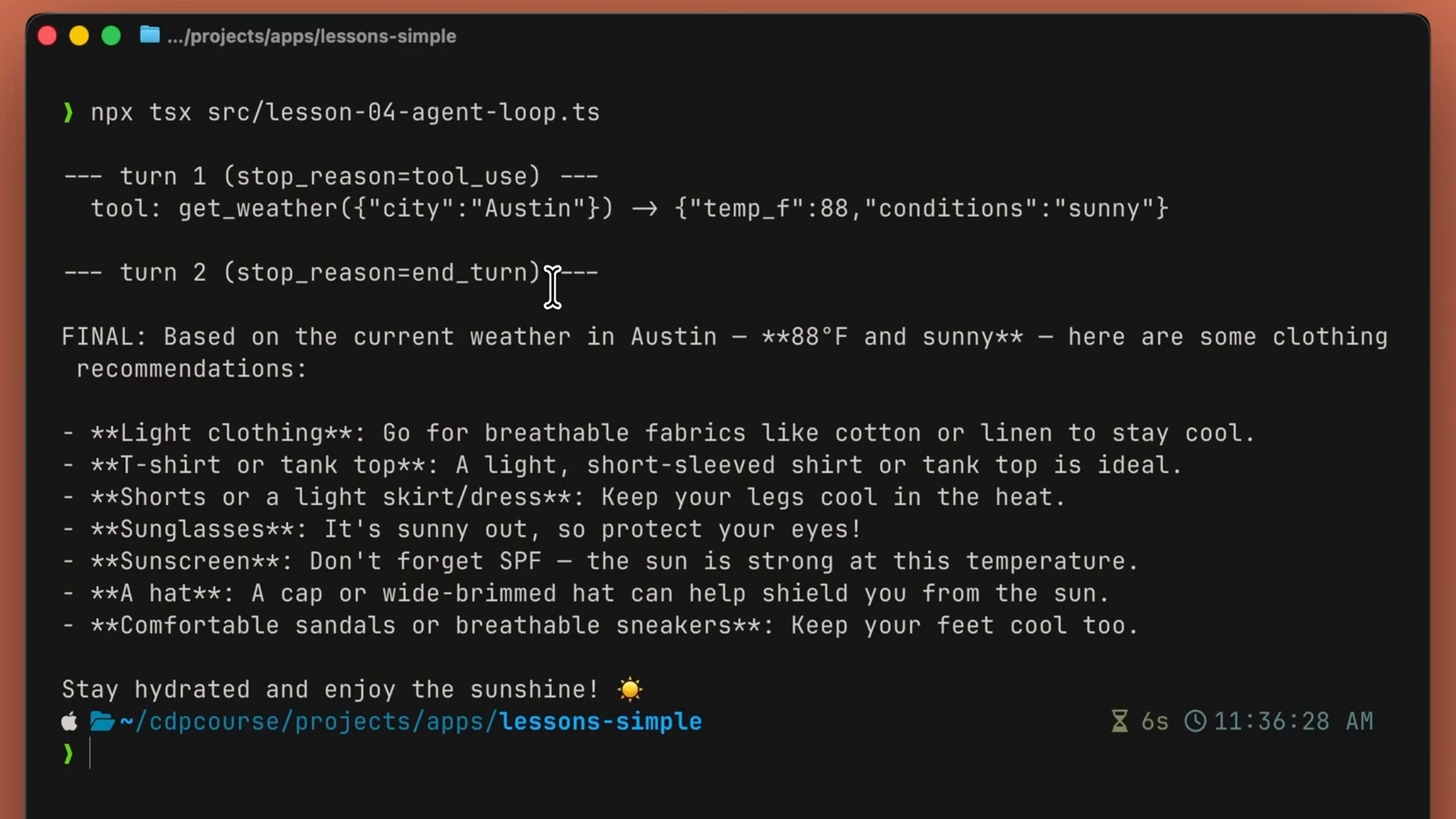
Two API calls, one tool execution, one final answer. That's the entire loop. Everything you build with the Claude API is going to be similar to this.
The same loop in production
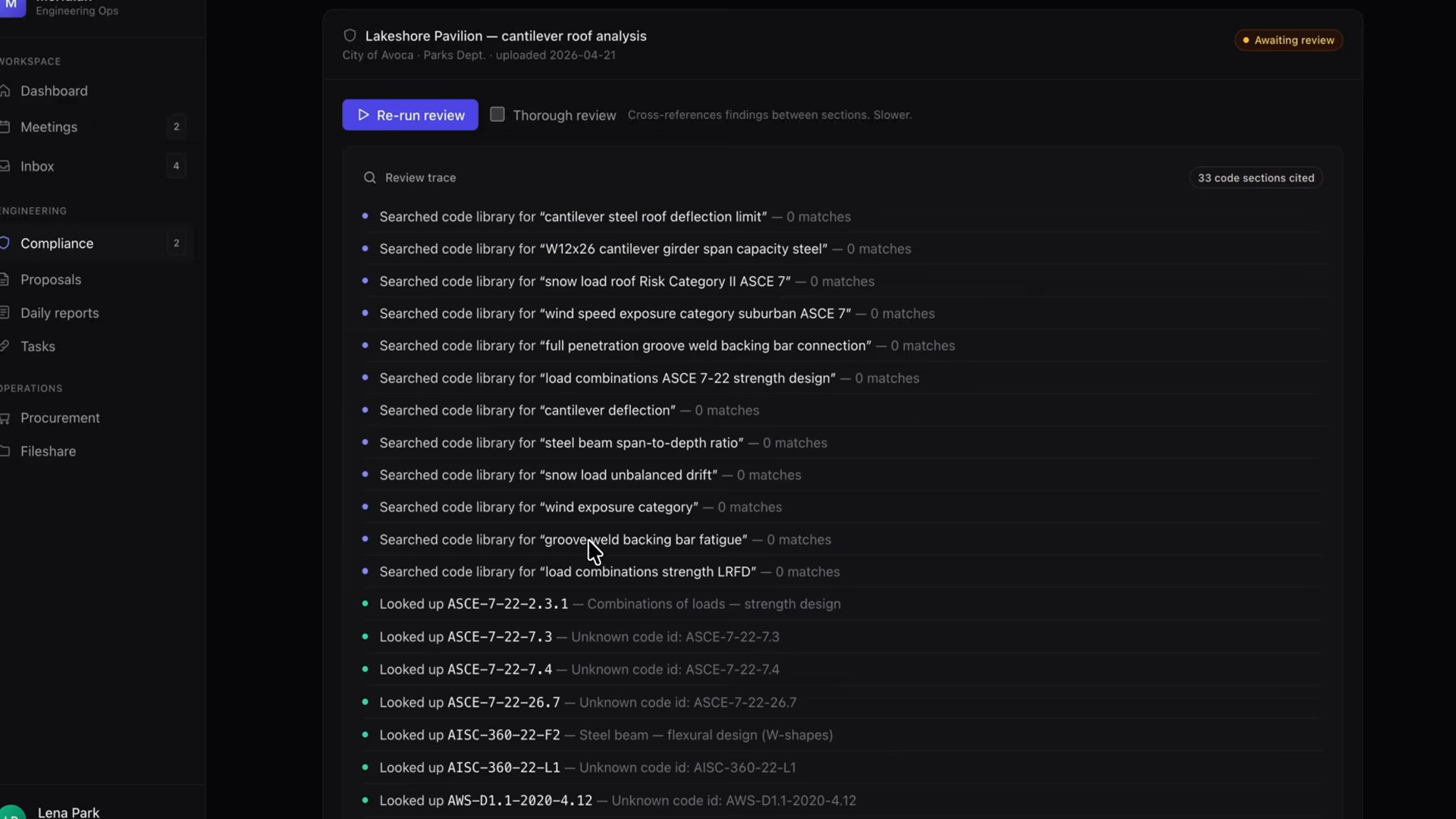
In a real environment, this same loop powers something like an auto-review endpoint: a compliance agent that reads a structural report, looks up the relevant building codes via a tool, and writes risk findings back to the database one by one as it works.
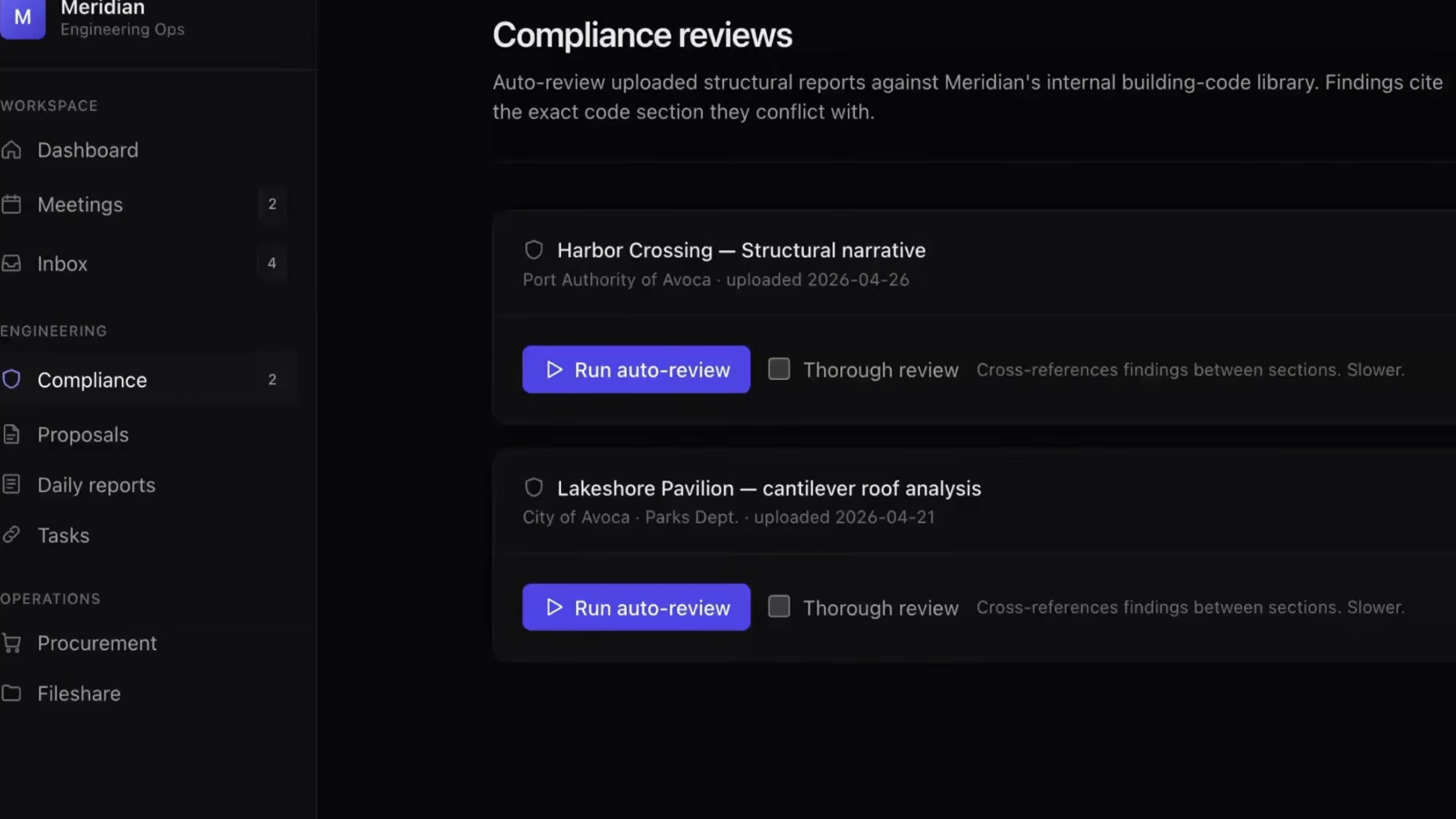
The shape of the loop is identical to what you just ran. The differences are:
- Real tools instead of a mock weather lookup.
- Results stream back to the UI as server-sent events.
- Findings get persisted to a risk-finding table.
Recap
- An agent is Claude in a loop: observe, decide, act, repeat.
- The loop is simple: send messages with tools, run any tool Claude requests, feed the result back, and stop when the stop reason is
end_turn. - You own the loop and the tools. Claude owns the reasoning.
- The same loop shape scales from a mock weather demo to a production compliance agent — only the tools and plumbing change.
- When you don't want to own the loop, managed agents run this exact loop for you on Anthropic's infrastructure.